News Release Notes & Update Announcements

  • Thread starter Thread starter Yun
  • Start date Start date
  • Featured
Status
Not open for further replies.
Welcome to our Release Notes & Update Announcements thread.

We will use this thread to keep you up to date with almost all changes made to the forum, including new features, improvements, bug fixes, and other important updates we make.

Our goal is to release updates more frequently and keep everyone informed. Whenever we add new features, we'll post it here so the community has a transparent overview of what's new and what's been improved.

We'll also be reviewing and implementing suggestions from our Suggestions & Feedback forum whenever possible. Community feedback plays a big part in shaping a community, and many future updates will be based on ideas submitted by our members.

Thanks for being part of the community, we appreciate all of your feedback and support :BongoCatWave:
 
New Features Update


Here is a quick rundown of a few things we have updated recently. 4 features in total, mostly small quality-of-life stuff, plus one bigger one: anonymous threads for more privacy.

Anonymous rating threads

Ever wanted to ask for photo advice without putting your name on it? Now you can. Threads in the Photo Advice forum have a new "post anonymously" option, when it's checked, your username gets swapped for "Anonymous" everywhere it would normally appear: the thread itself, quotes, alerts, replies, the activity feed, search, all of it.

A few details worth knowing:
  • Only head admins can see who you are. No moderator or other staff member can link an anonymous thread back to your account. Not from the post, not from the IP, not from the mod tools.
  • Why not fully anonymous? Because a fully anonymous system is also an unmoderatable one. If someone posts illegal content, ban-evades, or otherwise abuses the feature, we need a way to track and remove them. We'd love to have made it truly anonymous, but the only people with access to identity data on these threads are the 3 head admins, that's the trade-off.
  • The checkbox is on by default when you reply to an anonymous thread, so one careless click won't out you. Untick it if you want to switch back to your normal username for that reply.
  • You're hidden from "users viewing this thread" for 15 minutes after you post, so nobody can spot you from the viewer list either.
  • IP access is hidden from moderators on anonymous posts entirely. Only the head admins can see it.
  • Likes still work normally, including liking your own anonymous post, if you feel like it.

For now this is enabled for Photo Advice only.

1784734135987.webp


1784734140342.webp

1784734148859.webp


Typing indicators

You can now see when someone else is typing in a conversation or in a thread, similar to the typing bubble in Discord. Small thing, but it makes back-and-forth feel a lot more alive instead of wondering whether the other person saw your message.

Not a fan? You can switch it off entirely in your preferences for both sending and receiving, so you won't broadcast your typing and won't see anyone else's either.

Disable here:
1784646985411.webp


It looks like this above the reply field:
1784649860920.webp


Pinned posts

You can now pin posts, both on your own profile and inside your own threads. A pinned post stays visible at the top so the important stuff doesn't get buried under new replies.

Depending on your permissions you may not be able to pin in every sub-forum. If the option doesn't show up somewhere, that's why.

On profiles:
1784646080666.webp

1784646089737.webp

In threads:
1784646283651.webp


Follow counter

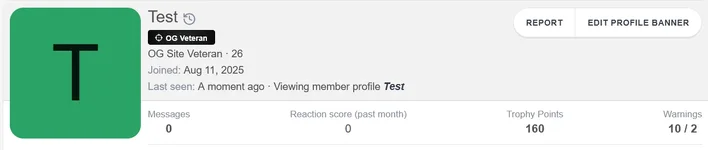
Your follower count now shows directly on your profile, so you don't have to open your profile details just to check the number.

1784646460077.webp

1784646478674.webp


That's the whole update. If anything looks broken or behaves weird, drop it in Suggestions & Feedback so we can take a look.
 
New Features Update
v1.23.3


Reputation score changes

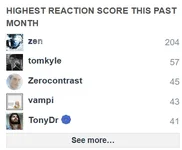
Reputation (reaction) points now display a monthly performance rather than lifetime totals. This update is now live across your post author cards, hover mini-profiles, and main profile pages. We've also updated the Notable Members page to display the monthly score as well.

1785429528806.webp
1785429689024.webp

These might be changed into a "yearly" statistic instead in the future, we'll see.


Profile member statistics

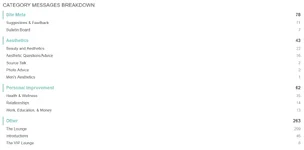
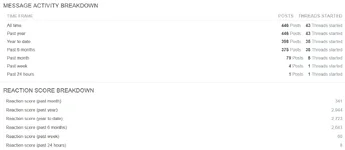
You can now see a user's message and reputation statistics in the "about" section of their profiles.

1785430904538.webp
1785430926401.webp


Pinned posts

Pinned posts is temporarily disabled until we can fix some bugs.


Icon changes

We've updated the site's icons to Lucide instead of Font Awesome. Let us know if you notice any missing icons anywhere.


That's the whole update. If anything looks broken or behaves weird, drop it in Suggestions & Feedback so we can take a look.
 
Last edited:
New Features Update
v1.24.0


Trophy cabinet

Trophies now have real icons instead of just a points number. Your earned trophies show as a cabinet on your profile (About + the trophies overlay), and the trophies help page lists the full set, ones you have not earned yet are greyed out.

The overlay is paginated, wider on desktop, and stacks cleanly on mobile so descriptions stay readable.


Reposts

You can now repost a thread post you like, same idea as TikTok / Twitter / Instagram. Hit Repost next to Reply on any post. That post then shows on a new Reposts tab on your profile (next to Profile posts, Latest activity, and Postings).

Click it again to remove the repost. Other people can browse the tab on your profile.


Online time

Profiles, hover cards, and the forum statistics block now show how long members have spent on the site (for example 12d 5h 51s). The sidebar total is Members online time.

You can hide yours under Account → Privacy with Show online time. You will still see it on your own profile.


Banned users and DMs

Banned and temporarily banned accounts can no longer reply to existing direct messages. They can still read conversations they are already in.


Hide tags: followers, following, mutual

The Hide dropdown in the editor now has three extra tags, same idea as “answers the thread”:

  • followers - only people who follow you
  • following - only people you follow
  • mutual - only people you follow each other


Pinned posts

Pinning is enabled again, the bugs are fixxed now.


That's the whole update. If anything looks broken or behaves weird, drop it in Suggestions & Feedback so we can take a look.
 
Status
Not open for further replies.
Back
Top